
Classic Graphing 84 manual · Chapter 18 of 25
Matrices
Enter matrices on the home screen or in the matrix editor, then add, multiply, invert, transpose, row-reduce and find determinants.
18.1Create and store a matrix#
The calculator has ten matrices, [A] to [J]. On the home screen a matrix is written with square brackets: each row is in its own pair, so [[1,2][3,4]] has two rows. Use 2nd[× for [ and 2nd]− for ]. Store it with sto→ and a name from 2ndMATRIXx⁻¹ (MATRIX), NAMES tab.
Store a 2×2 matrix in [A]
Type [[1,2][3,4]], press sto, choose [A] with 2nd inv, 1, and press enter.
2nd[×2nd[×1,22nd]−2nd[×3,42nd]−2nd]−sto→2ndMATRIXx⁻¹1enter
![Result of the example "Store a 2×2 matrix in [A]" The display shows: [[1,2][3,4]]→[A] / [[1 2] / [3 4]].](/trident/app/help/manual/img/4c8c97b5s.webp)
[[1 2] [3 4]]![The MATRIX menu, NAMES tab (dimensions are shown once a matrix exists). The display shows: [NAMES] MATH EDIT / 1:[A] / 2:[B] / 3:[C] / 4:[D] / 5:[E] / 6:[F] / 7↓[G].](/trident/app/help/manual/img/c95ddb5as.webp)
The MATRIX menu has three tabs: NAMES (paste a matrix name), MATH (operations) and EDIT (fill in a matrix).
18.2Fill a matrix in the matrix editor#
Press 2ndMATRIXx⁻¹, ◀ for EDIT and choose a name. First type the number of rows and press enter, then the number of columns and enter. The cells appear: type each value and press enter to move along the row and then to the next row. Press clear to leave.
Build [B] and take its determinant
Open EDIT, choose [B], and set 2 rows and 2 columns.
2ndMATRIXx⁻¹◀22enter2enter![After step 1: Open EDIT, choose [B], and set 2 rows and 2 columns. The display shows: 1 | 2 / 0 | 0 / 0 | 0 / [B](1,1)=0.](/trident/app/help/manual/img/1e220303s.webp)
Enter 4, 7, 2, 6.
4enter7enter2enter6enterGo home and calculate det([B]).
2ndQUITmode2ndMATRIXx⁻¹▶12ndMATRIXx⁻¹2)enter
![Result of the example "Build [B] and take its determinant" The display shows: det([B]) / 10.](/trident/app/help/manual/img/4f628744s.webp)
det([B]) 1018.3Add, multiply, invert and transpose#
Matrices of the same size can be added and subtracted. A matrix times a number scales every entry. Two matrices multiply when the columns of the first equal the rows of the second. x⁻¹ gives the inverse of a square matrix (a SINGULAR MAT error if there is none), and ᵀ in the MATRIX MATH menu (item 2) gives the transpose.
Multiply [A] by itself
Store [[1,2][3,4]] in [A].
2nd[×2nd[×1,22nd]−2nd[×3,42nd]−2nd]−sto→2ndMATRIXx⁻¹1enterType [A][A].
2ndMATRIXx⁻¹12ndMATRIXx⁻¹1enter
![Result of the example "Multiply [A] by itself" The display shows: [[1,2][3,4]]→[A] / [[1 2] / [3 4]] / [A][A] / [[ 7 10] / [15 22]].](/trident/app/help/manual/img/2ac08d9fs.webp)
[15 22]]Inverse
Store [[1,2][3,4]] in [A], then type [A] followed by the x⁻¹ key.
2nd[×2nd[×1,22nd]−2nd[×3,42nd]−2nd]−sto→2ndMATRIXx⁻¹1enter2ndMATRIXx⁻¹1x⁻¹enter
![Result of the example "Inverse" The display shows: [[1,2][3,4]]→[A] / [[1 2] / [3 4]] / [A]⁻¹ / [[ ⁻2 1] / [1.5 ⁻.5]].](/trident/app/help/manual/img/7d082a8as.webp)
[1.5 ⁻.5]]Transpose
Store [[1,2][3,4]] in [A]. Type [A], then 2nd inv, right, 2 for ᵀ.
2nd[×2nd[×1,22nd]−2nd[×3,42nd]−2nd]−sto→2ndMATRIXx⁻¹1enter2ndMATRIXx⁻¹12ndMATRIXx⁻¹▶2enter
![Result of the example "Transpose" The display shows: [[1,2][3,4]]→[A] / [[1 2] / [3 4]] / [A]ᵀ / [[1 3] / [2 4]].](/trident/app/help/manual/img/0d10f36as.webp)
[[1 3] [2 4]]Determinant
Store the matrix, then use det( from the MATH tab (item 1).
2nd[×2nd[×1,22nd]−2nd[×3,42nd]−2nd]−sto→2ndMATRIXx⁻¹1enter2ndMATRIXx⁻¹▶12ndMATRIXx⁻¹1)enter
![Result of the example "Determinant" The display shows: [[1,2][3,4]]→[A] / [[1 2] / [3 4]] / det([A]) / ⁻2.](/trident/app/help/manual/img/69af8efds.webp)
det([A]) ⁻218.4The MATRIX MATH menu#
![The MATH tab of the MATRIX menu. The display shows: NAMES [MATH] EDIT / 1:det( / 2:ᵀ / 3:dim( / 4:Fill( / 5:identity( / 6:randM( / 7↓augment(.](/trident/app/help/manual/img/93427938s.webp)
| Item | Command | What it does |
|---|---|---|
| 1 | det( | Determinant of a square matrix. |
| 2 | ᵀ | Transpose (rows become columns). |
| 3 | dim( | Size as a list {rows columns}. |
| 4 | Fill( | Fill a matrix with one value: Fill(value, [A]). |
| 5 | identity( | The identity matrix of a given size. |
| 6 | randM( | A matrix of random whole numbers: randM(rows, columns). |
| 7 | augment( | Join two matrices side by side. |
| 8 | Matr►list( | Copy matrix columns into lists. |
| 9 | List►matr( | Make a matrix from lists. |
| 0 | cumSum( | Running totals down each column. |
| A | ref( | Row echelon form. |
| B | rref( | Reduced row echelon form. |
| C | rowSwap( | Swap two rows: rowSwap([A],1,2). |
| D | row+( | Add one row to another: row+([A],1,2). |
| E | *row( | Multiply a row by a number: *row(3,[A],2). |
| F | *row+( | Add a multiple of one row to another. |
Identity matrix
Press 2nd inv, right, 5 (identity(), type 2 and a bracket.
2ndMATRIXx⁻¹▶52)enter
![Result of the example "Identity matrix" The display shows: identity(2) / [[1 0] / [0 1]].](/trident/app/help/manual/img/6b01a5c1s.webp)
[[1 0] [0 1]]Size of a matrix
Store a matrix in [A]. Press 2nd inv, right, 3 (dim(), paste [A] and close.
2nd[×2nd[×1,22nd]−2nd[×3,42nd]−2nd]−sto→2ndMATRIXx⁻¹1enter2ndMATRIXx⁻¹▶32ndMATRIXx⁻¹1)enter
![Result of the example "Size of a matrix" The display shows: [[1,2][3,4]]→[A] / [[1 2] / [3 4]] / dim([A]) / {2 2}.](/trident/app/help/manual/img/db4c753fs.webp)
{2 2}18.5Solve a system of linear equations with rref#
Write the system as an augmented matrix, one row per equation, with the constants in the last column, and ask for rref(. The identity pattern on the left leaves the solutions in the last column.
Solve 2x + y = 5 and x + 3y = 10
Press 2nd inv, right, alpha apps (B: rref(), then type the augmented matrix and a bracket.
2ndMATRIXx⁻¹▶alphaBapps2nd[×2nd[×2,1,52nd]−2nd[×1,3,102nd]−2nd]−)enter
![Result of the example "Solve 2x + y = 5 and x + 3y = 10" The display shows: rref([[2,1,5][1,3,10]]) / [[1 0 1] / [0 1 3]].](/trident/app/help/manual/img/55d9793bs.webp)
[[1 0 1] [0 1 3]]Row-reduce a 2×3 matrix
rref( of [[1,2,3][4,5,6]].
2ndMATRIXx⁻¹▶alphaBapps2nd[×2nd[×1,2,32nd]−2nd[×4,5,62nd]−2nd]−)enter
![Result of the example "Row-reduce a 2×3 matrix" The display shows: rref([[1,2,3][4,5,6]]) / [[1 0 ⁻1] / [0 1 2]].](/trident/app/help/manual/img/a630e331s.webp)
[[1 0 ⁻1]No inverse
Store [[1,2][2,4]] in [A] (its rows are multiples) and try [A]⁻¹.
2nd[×2nd[×1,22nd]−2nd[×2,42nd]−2nd]−sto→2ndMATRIXx⁻¹1enter2ndMATRIXx⁻¹1x⁻¹enter
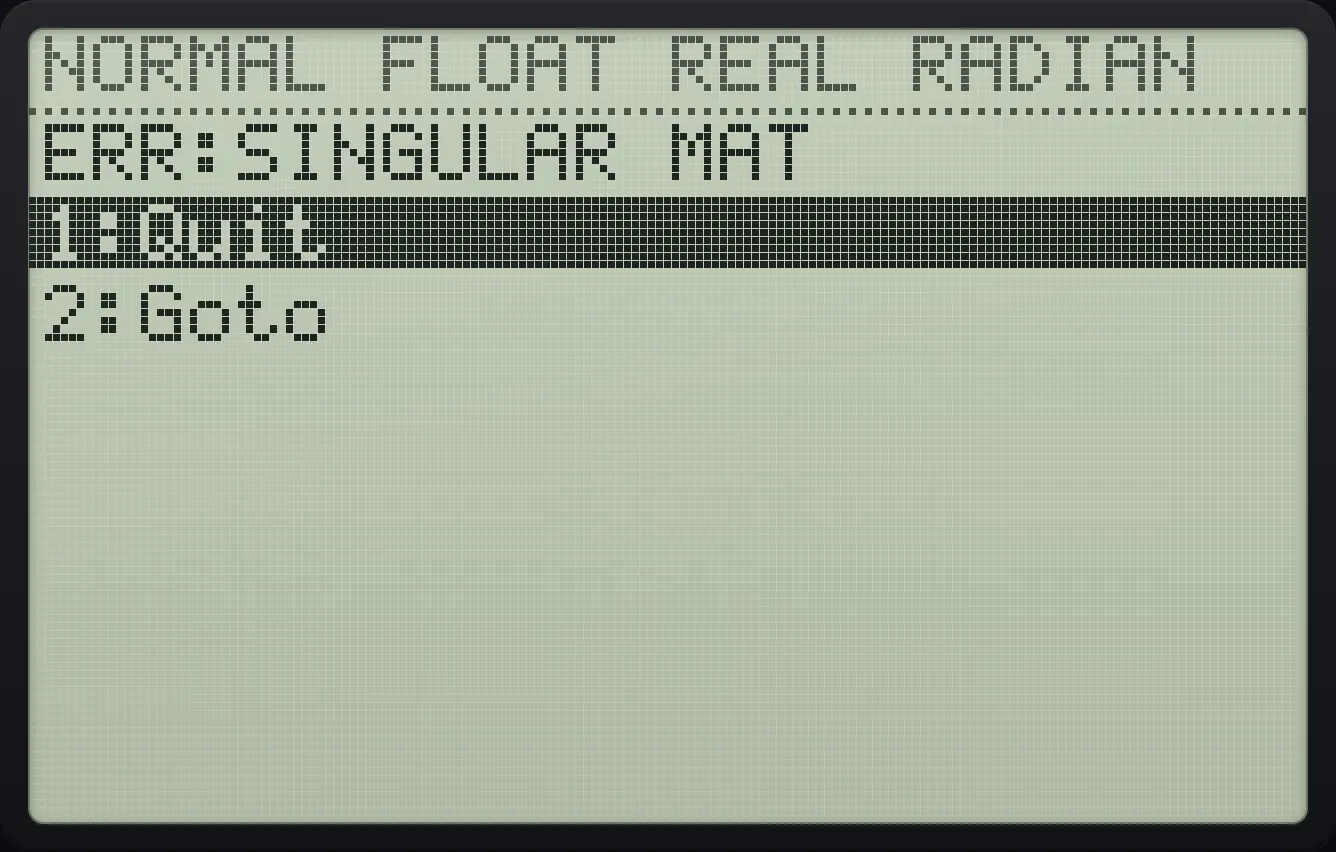
ERR:SINGULAR MATTI-84 Plus CE is a trademark of Texas Instruments Incorporated. Trident Calculator is an independent product by South View Studios and is not affiliated with, sponsored by or endorsed by Texas Instruments. The name is used only to describe the kind of calculator this model resembles; Trident's names, keys, display, fonts and software are its own clean-room design.